UK airspace is genuinely complex. Between Class D controlled airspace, airport Flight Restriction Zones (FRZs), temporary NOTAMs issued with less than 24 hours' notice, Danger Areas, and a patchwork of conservation designations that affect where you can responsibly fly — the information a UK drone pilot needs before take-off is scattered across half a dozen official sources.
UK Drone Map was built to consolidate all of it into one fast, map-based interface that works offline once loaded, runs on any device, and never asks for your email address. Here are the five features that matter most.
Complete UK airspace layer — everything on one map
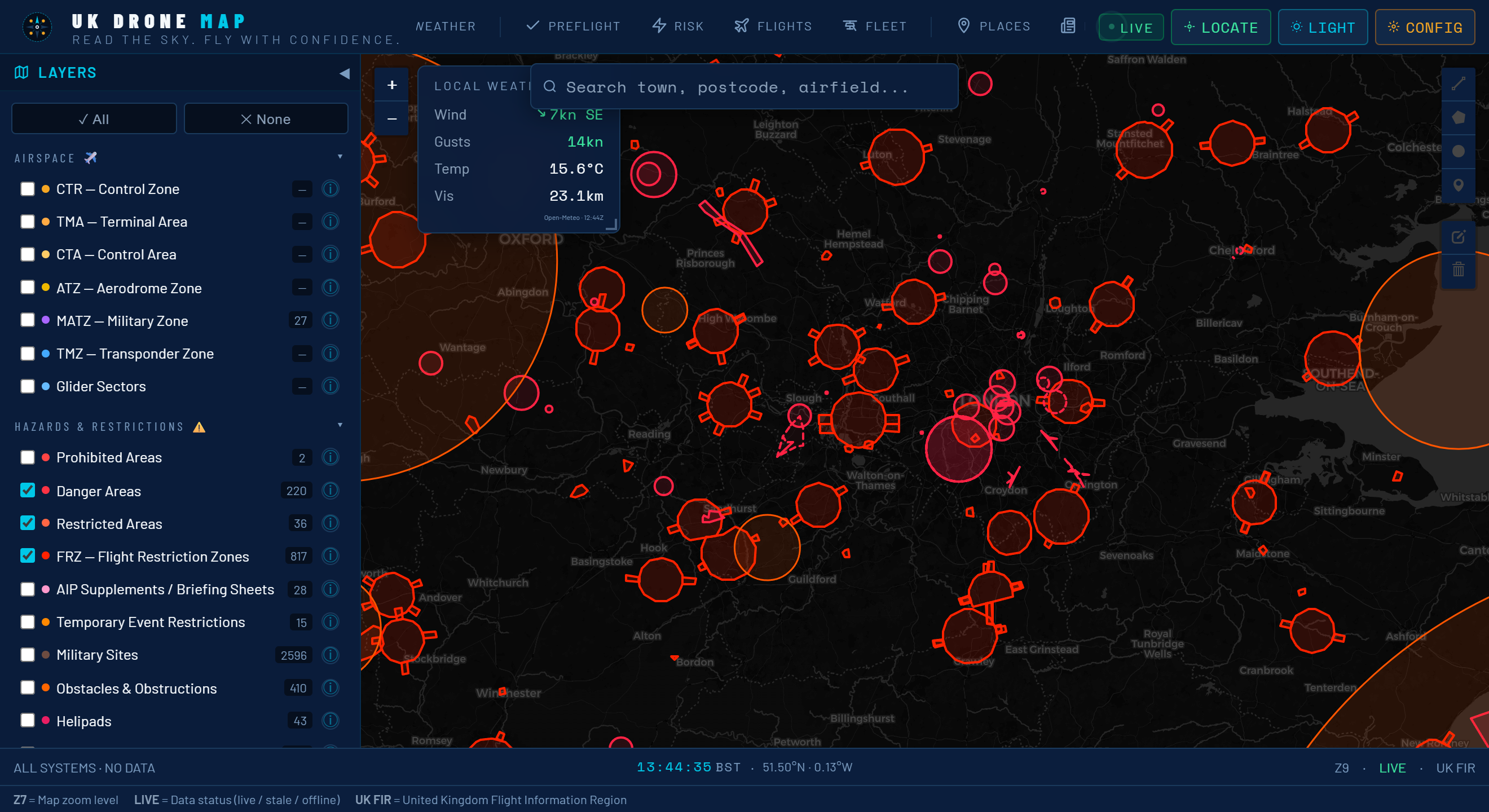
The core of UK Drone Map is its layered airspace visualisation. Every time you open the app it loads the current picture of UK airspace from official sources — CAA AIP data, OpenAIP, and NATS NOTAMs — and renders them as colour-coded overlays on a Leaflet base map:
- Blue (Class D/C/A airspace): Controlled airspace where UAS flight is prohibited or requires ATC clearance. Includes the busy terminal areas around London, Manchester, Birmingham, and Edinburgh.
- Red (Flight Restriction Zones): The hard no-fly circles around UK aerodromes. Drones are banned within these zones under Article 94A of the Air Navigation Order without prior written permission from the aerodrome operator.
- Orange (Active NOTAMs): Temporary restrictions — Red Arrows rehearsals, Royal Flights, sporting events, military exercises — that can activate with less than 24 hours' notice.
- Green (Conservation zones): SSSI, SAC, Ramsar, NNR, AONB and National Park boundaries. No automatic flight ban, but sensitive habitats require careful judgment before you fly.
All layers are toggleable. You can turn off categories you don't need for a specific flight and focus on what matters for your location.
Offline note: Pan and zoom over your planned fly site while you have signal. The app caches those map tiles locally via the browser's Cache API, so the same area renders without a data connection when you're standing in a field.
Real-time NOTAM checker — no more missed restrictions
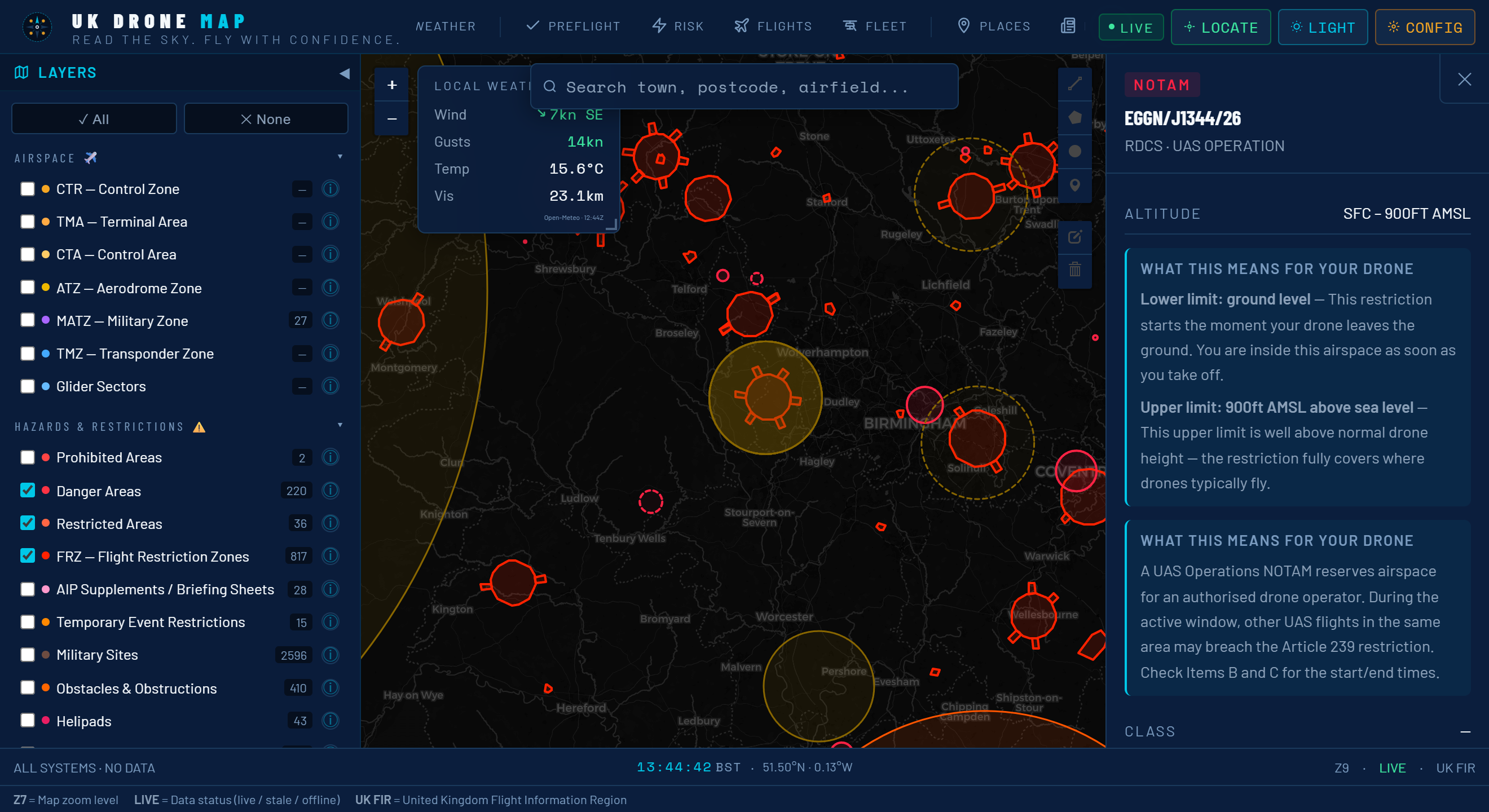
NOTAMs (Notices to Airmen) are the most underestimated hazard in UK drone flying. Most pilots know to check them in principle; far fewer actually do — partly because the official NATS NOTAM briefing system presents raw text formatted for manned aviation professionals, not for someone who just wants to know if they can fly at their local park on Saturday morning.
UK Drone Map takes those raw NOTAM feeds and renders them spatially. Active NOTAMs appear as orange zones directly on the map. Tap or click any zone and the app decodes the ICAO NOTAM format into plain English:
- Restriction type (drone activity ban, parachute drop, Red Arrows, Royal Flight, etc.)
- Affected radius in nautical miles and kilometres
- Altitude band (surface to X feet, or between specific flight levels)
- Exact validity window in UTC, converted to your local time
- The raw NOTAM text for cross-reference with official sources
The NOTAM layer refreshes automatically when you open the app and can be manually refreshed with a single tap. A badge on the NOTAMs tab shows how many active restrictions exist within the current map view — making it immediately obvious before you've even zoomed in whether the area is clean or busy.
Important: UK Drone Map uses NOTAM data for situational awareness. Always cross-reference with the official NATS UK AIS pre-flight briefing for safety-critical decisions. NOTAM timing can change and new restrictions can be issued at any time.
Flight Restriction Zone detail — know the exact boundary
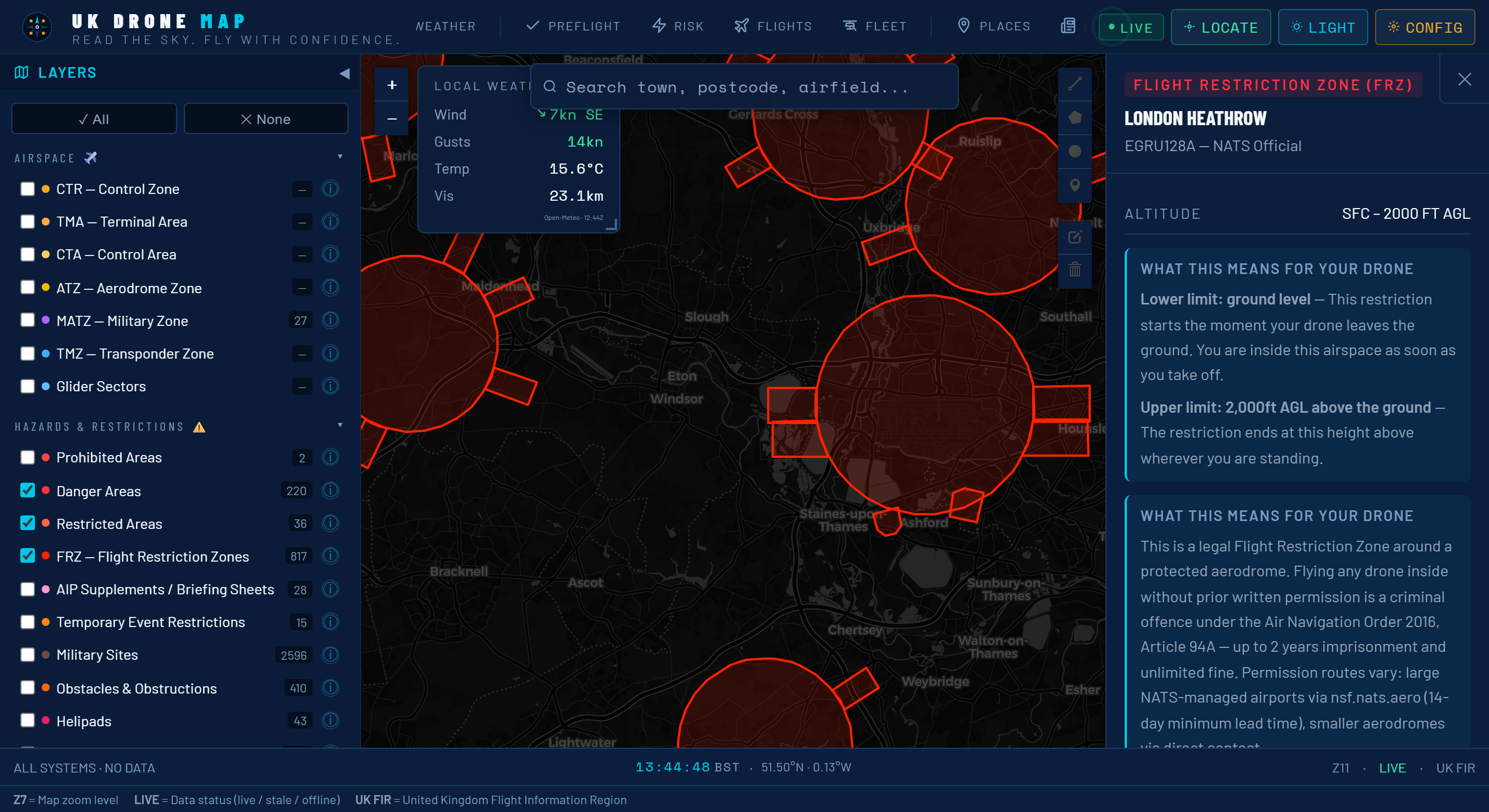
There are over 120 licensed aerodromes in the UK, each with its own Flight Restriction Zone. The FRZ is not simply a flat prohibition — the rules differ depending on how far you are from the runway threshold:
| Distance from aerodrome | Rule (ANO Article 94A) |
|---|---|
| 0 – 1 km | Absolute no-fly. No permission available. |
| 1 – 3 km | No-fly zone. Written permission from aerodrome required. |
| 3 – 5 km | Permission required from aerodrome operator before flight. |
| 5 – 7 km | Awareness zone. No formal ban, but NOTAMs common. Check thoroughly. |
UK Drone Map renders each FRZ with concentric rings colour-coded to those bands, so you can see at a glance whether your planned fly site is inside the restriction, in the permission zone, or clear. Tapping an airport pulls up the aerodrome's ICAO code, the FRZ radius, and — where available — the contact telephone number for the airfield management office you'd need to call for a permission request.
This is particularly useful for sites near small airfields and heliports that aren't well publicised. Several pilots have been stopped flying within an FRZ they didn't know existed because they only checked the major airports on a consumer app.
Conservation and protected area layers — fly responsibly
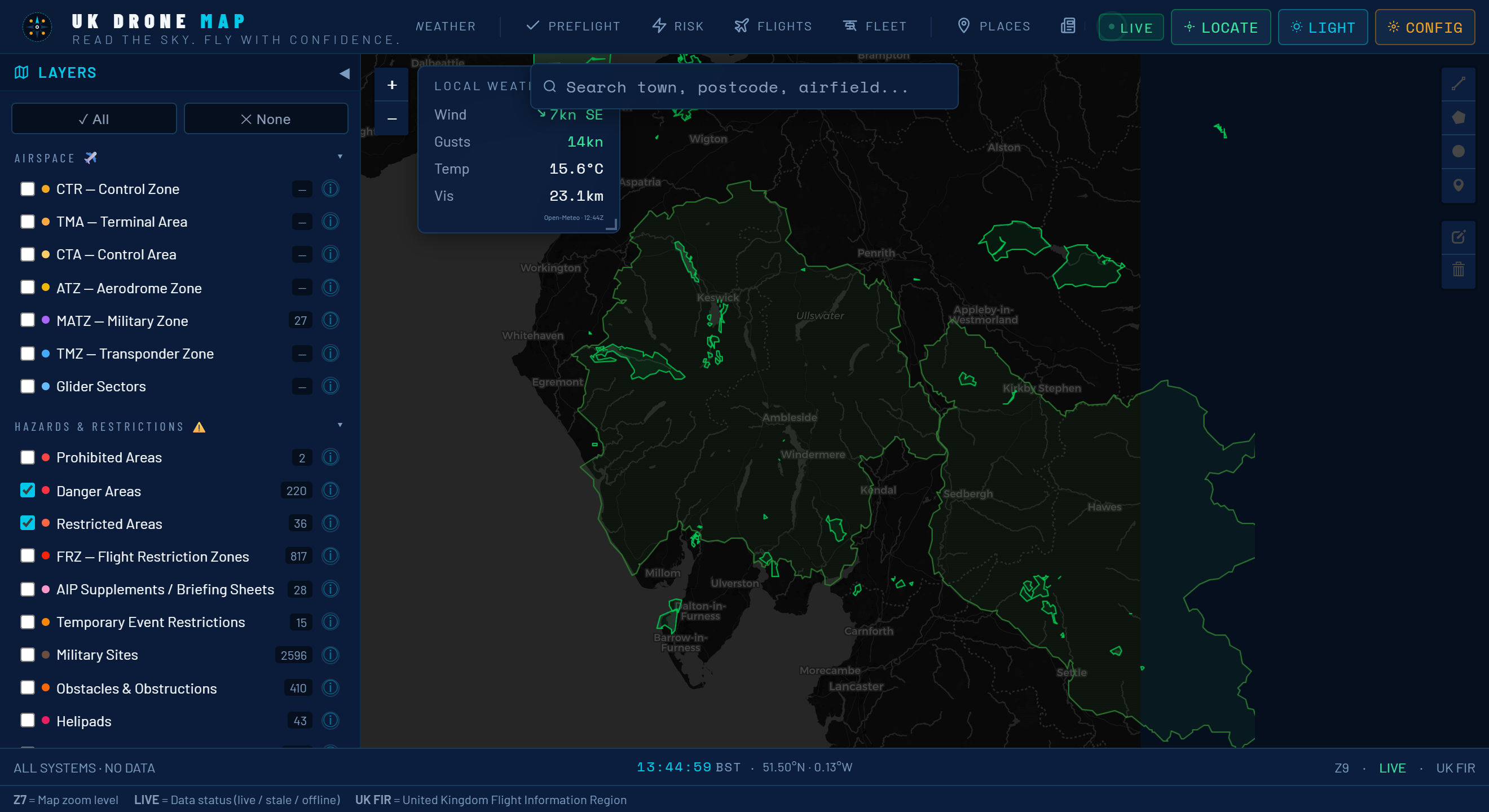
Almost a third of the UK land area carries some form of conservation designation. None of these automatically prohibit drone flight in the way that FRZs do — but ignoring them is a legal and ethical risk that more pilots are encountering as enforcement catches up with the growth of the hobby.
UK Drone Map currently layers four major designations:
- SSSI — Sites of Special Scientific Interest: Designated by Natural England (England), NatureScot (Scotland), Natural Resources Wales, and NIEA (Northern Ireland). No blanket drone ban, but disturbing wildlife on an SSSI can attract criminal charges under the Wildlife and Countryside Act 1981.
- SAC — Special Areas of Conservation: European Habitats Directive sites (retained in UK law post-Brexit). Stricter habitat protection, and some have land management agreements that restrict low-level overflights.
- AONB — Areas of Outstanding Natural Beauty: High landscape sensitivity. Local planning authorities often impose additional conditions on commercial operations. The new National Landscapes designation replaces AONB in England and Wales.
- National Parks: By-laws can vary park to park. Several UK National Parks have issued guidance asking drone pilots to use permitted launch sites or seek warden approval for sensitive locations.
The practical value of having these layers on the same map as the airspace data is that you can quickly assess the complete picture at a site: is it inside an FRZ? Is there a NOTAM? Is it an SSSI? Is it a National Park? Previously, answering those four questions meant visiting four separate websites.
Pre-flight checklist with live weather — a go/no-go tool
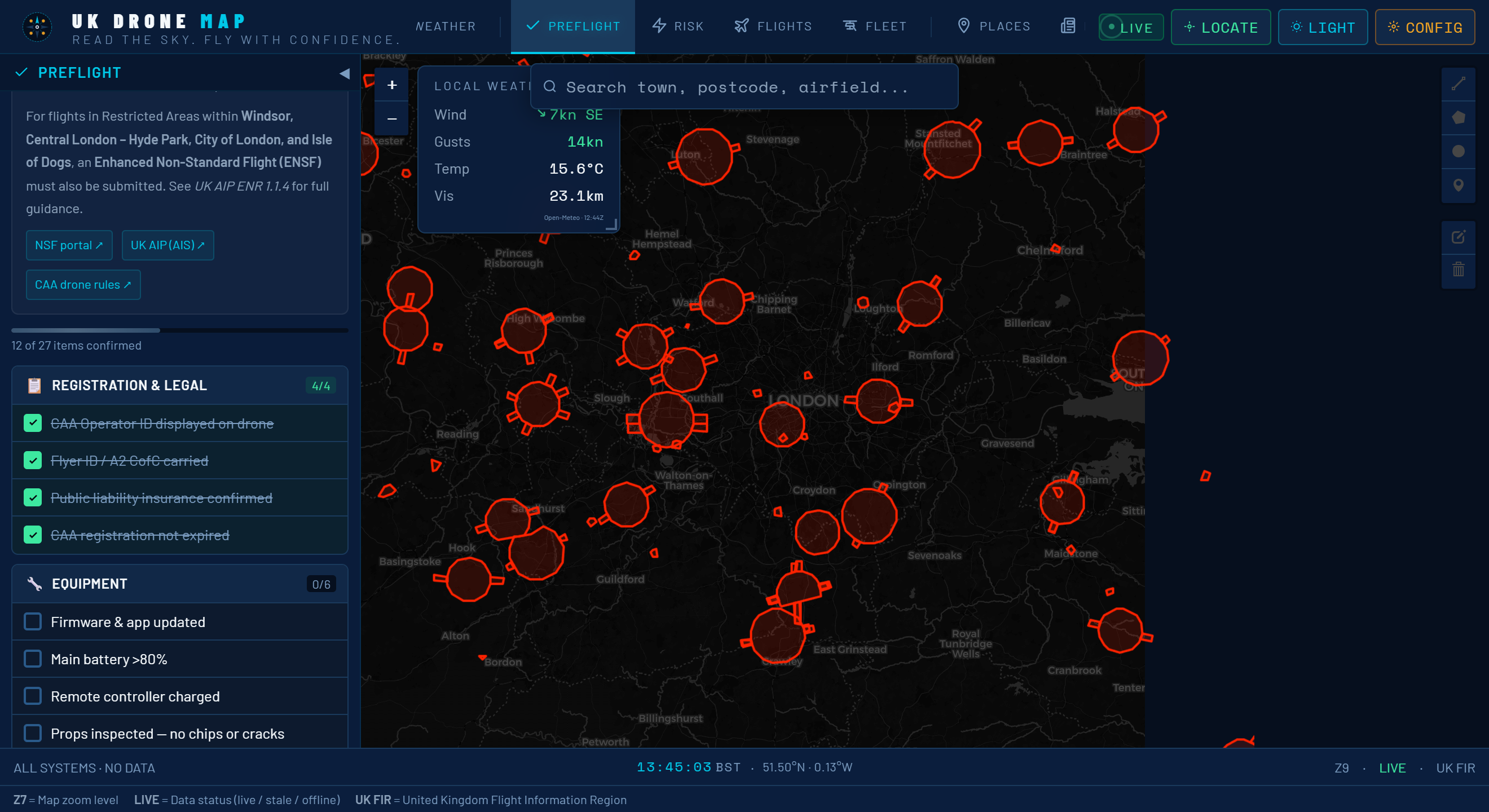
Knowing the airspace is clean is only one part of pre-flight preparation. UK Drone Map's built-in checklist and weather integration handle the rest in a single screen, replacing the separate apps and mental checklists most pilots run through informally.
The six-point checklist
The pre-flight checklist covers the six things that, if skipped, create the most common causes of illegal or unsafe flights:
- Airspace check — confirms no controlled airspace intersects the planned fly site
- NOTAMs reviewed — shows the count of active NOTAMs within 5 km and the time they were last checked
- Flyer ID valid — reminder to verify the CAA registration hasn't lapsed (annual renewal required)
- Battery and aircraft — prompts for physical inspection: props, battery charge, cell voltage
- Weather within limits — live wind, visibility and cloud data against the CAA minimums for the aircraft's operating category
- Third-party insurance — confirms cover is active (mandatory for commercial operations; strongly advisable for all flights)
Live weather via Open-Meteo
The weather widget pulls live conditions from Open-Meteo, a free, no-API-key weather service that provides hyperlocal forecasts at 1 km resolution across the UK. Displayed values include:
- Wind speed and direction at surface level (knots and km/h), with gust data
- Visibility in kilometres (flagged if it drops below the 5 km daytime VFR minimum)
- Cloud base in feet AMSL (flagged below 400 ft, the minimum for maintaining VLOS)
- Temperature and precipitation probability
- A 3-hour GO/NO-GO outlook so you can decide whether to fly now or wait
The GO/NO-GO indicator evaluates the combination of conditions against Beaufort 4 as a practical drone wind limit, 5 km visibility, and cloud base above 400 ft — the conditions under which most recreational pilots and sub-7 kg commercial operations remain safely legal and controllable. It's a starting point, not a regulatory instrument; always apply your own judgment for your specific aircraft.
No account needed. The checklist state is saved locally in your browser. No data is sent to any server, and there's no sign-in. If you clear your browser storage, the checklist resets — but your aircraft and saved locations survive if you're using the PWA.
Who is UK Drone Map for?
The app is designed for any UK pilot who cares about flying legally and safely, from beginners using a DJI Mini 4K under 250g through to commercial operators flying under PDRA-01 or GVC permissions.
It's particularly useful for:
- Pilots who fly in unfamiliar locations and need a quick situational read before committing to a drive.
- Commercial pilots who need to document that they performed a pre-flight airspace and weather check.
- FPV pilots who need to quickly assess whether a prospective flying spot has FRZ overlap or SSSI sensitivity before bringing the whole crew.
- Instructors and schools who want a free, browser-based tool to demonstrate airspace concepts during theory training.
| Spec | Detail |
|---|---|
| Cost | Free, no subscription, no in-app purchases |
| Account required | None |
| Platforms | Any modern browser · iOS PWA · Android PWA · Desktop |
| Offline support | Yes — map tiles and airspace data cached locally |
| Tracking | None — no analytics, no location logging |
| Airspace data | CAA AIP · OpenAIP · NATS NOTAMs |
| Weather data | Open-Meteo (free, no API key) |
UK Drone Map is updated continuously as CAA regulations change, new airspace boundaries are published, and new data sources become available. The PWA install means you always get the latest version without visiting an app store.